Settings
 Fast Delivery
 Payment Types


 Marketplace Product

Mfr Part # ABX00173
ARDUINO UNO Q 4GB RAM 32GB EMMC
Arduino

License: Attribution Non-commercial Camera 3D Printing UNO Q Dream Lab Arduino
This is not a medical device. This is or is trying to be a low-cost system that is designed to be easily connected to the other devices and allow control of a growing eco-system of controls and devices.
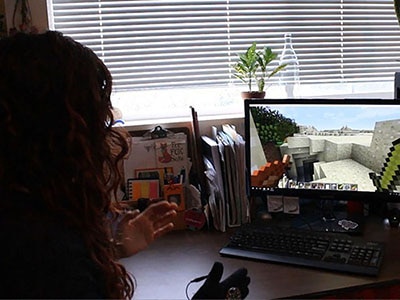
The setup from Maker Faire, which ended on September 27, 2026. A 15-inch screen, a webcam, an Arduino UNO Q in a yellow printed case, a USB Hub, and a mouse until we hook up a T-Rex Sip-N-Puff sensor. On the screen, Bunny Feeding Frenzy. The player has no controller — they aim with their eyes, and later we will add the sip-n-puff to throw carrots with your breath or a rubber chicken. For now, it has auto-throw turned on. Eye-focus and any blink triggering is beyond the compute of the Uno Q using the techniques we have implemented and can be a little more stressful for the eyes. The mouse is being used for navigating menus.
Here we see one of over 100 people from Maker Faire who helped train our eye-tracking software. People can use the same eye-tracking calibration, but that wouldn't get us all the training data to make the device better in the future.
This is my daughter Nova getting her first instructions about the device and going through her first training attempt. She, like many others, moved her head too much during her first training session.
This is her playing the Bunny Feeding Frenzy game ...
It works like this: you sit down 50-70 cm from the camera, you try not to move your head, and you calibrate the system to track your eye movement, and that calibration is saved for us to make the system better. You are guided through 9 points, and then either the bunny feeding frenzy game begins, or you go into our open-source communication system (AAC) and interact with the chosen application.
We told people they could use our big buttons, touchscreen, or rubber chicken sip-n-puff input systems, which all work well ... or you can use our not-great eye-tracking. It is good enough to hold within a single box on a 4x2 screen, but not by much; lots of drift.
Then a dad held his daughter's head still while she trained and played the game, and it was dead steady, and our system is now upgraded to not-yet-great eye-tracking. We learned that our problem is related to head movement and especially to losing track of one or both eyes.
After talking with Massimo Banzi, I had the information I needed to greatly improve the tracking. He told me there is a carrier board that supports 2 CSI cameras; this allows us to use 2 NoIR cameras instead of USB. This gives us a huge improvement, allowing us to use 850nm IR and regular LEDs to light up the user, which is known to make the pupils pop. Going to 2 cameras should be possible on the carrier board, preventing us from losing one of the eyes and giving us more easily calculated data for head positioning. We hope that the net effect will yield enough compute to process both cameras and therefore get good eye tracking results.
Additionally, for fun, I put an ArUco tag (like a QR code, but for tracking) on my glasses and did near-perfect head tracking on a fork of my code on 2026/9/27. In truth, I should have been doing this write-up, but, in my defense, it was shiny.
There are a lot more details in the project GitHub, and I will try to update both it and this as we improve the system.
As you can undoubtedly tell, this is being written up at the last minute to meet the #UNOQDreamLab deadline, but I think the content makes up for the last-minute documentation.
I'm going to finish up with the why. I build open-source communication systems and assistive devices in my spare time targeting people with unmet needs. I have working big-button, pocket-sized, touch-screen/breath-controlled, and IMU-controlled systems, and I had eye-tracking on my list of nice-to-haves. These also interface with other devices; I have IMU and breath controls that also work as mice / joysticks / keyboard inputs / and connect to the XAC devices. Almost everything is written in python / circuitpython, so we don't have to worry about compilers, and everything is in human-readable form. All the configuration files are currently text files with meaningful names, and all of the communication systems are running the same code base with different configuration settings. More details can be found on my website, T-Rex Successful, Slightly Famous, Autistic Adult
Finally, here are a couple of result graphs showing eye tracking vs head tracking and eye tracking error vs head movement. The head tracking would have looked better if I wasn't experimenting or if I took more samples, but you can see the clustering when I stopped moving.
Before the show I spent many hours training the device and trying such things as calibrated novelty glasses. During maker faire we had 125 people sit behind the eye-tracking demo and 87% of them achieved 10° or better, past 20° of head turn tracking stops, and the red lamp made gaze 3.2× steadier. This is sufficient to use the devices with T-Rex Talker as-is, but we expect to produce a much more natural and precise eye-tracking with the improvements we will be implementing. Stay tuned for an update!
Finally: Everything runs on the UNO Q itself, with no PC and no cloud. Unfortunately, we were unable to fully utilize the power of the GPU because our only GPU-capable pipeline, MediaPipe, installs but crashes with SIGILL on the A53's older ARMv8.0 instructions. With the Maker Faire and contest deadlines, we ran the face and iris models directly in LiteRT on the four Cortex-A53 cores. Capturing at the models' native resolution raised the frame rate from 15 to 23 fps. We were able to do all this running on top of two of our existing apps, Bunny Feeding Frenzy and T-Rex Talker 3.0, which demonstrates the power of the device to be the sole device, or to be a mouse, a keyboard, or things we haven't even thought of. We expect to bring up the GPU through LiteRT's GPU delegate shortly and will post updated results. Faster inference won't fix the main failure, though: no amount of compute lets a single camera follow the head turning real users did. The answer is two cameras, and with GPU acceleration in place we expect the UNO Q to process both.